|
|
Archive for the ‘Tech’ Category
Sunday, November 14th, 2010
In a recent newsletter, I mentioned wanting to do some testing – something I feel I ought to do regularly. One of Ansel’s favorite quotes (attributed to Pasteur) was “chance favors the prepared mind.” Having started his creative life as a musician, he brought that musician’s discipline to his photography – the equivalent of a regimen of playing scales.
The first thing to test periodically is your light meter. Except for one old Nikon, none of my cameras have meters in them – so my meter(s) are the foundation of every exposure I make. The only requirement I have of a meter is that it be linear – that is – if I expose a gray or white card in dim light, bright light , medium and dim again and expose exactly as the meter indicates, each exposure should yield the same density on film. If the densities match closely, my meter is good, but if one exposure doesn’t match the others, the meter needs to go to the shop. This test is well worth the time and cost of a roll or few sheets of film!
Incidentally, this is a great way to test your meter’s color response. Instead of photographing subjects of different brightnesses, photograph a neutral card then do it through strong-colored filters – you’ll likely see reds underexpose and blues overexpose!
Once I’ve verified my meter’s linearity, I re-test for film speed and development time. I’ve switched to a new processing timer in the last year or two and changed some timer calibrations (see New Darkroom Timer, below) so it’s time for a double-check. I’m also going to compare my current “standard” film, TMax 100 with Ilford’s Delta 100 and FP4+. A friend recently showed me a test he’d done with TM100 and FP4, and the tonal renditions were quite different, so I want to take a look for myself. He also had some interesting results comparing Kodak Xtol and Ilford’s ID11 – so I think I’ll look into that, too.
All this testing doesn’t really need to take a lot of time – I don’t worry about making “art.” I can expose two sets of film and develop in separate developers – or expose a whole roll of film the same, cut the roll in half and develop separately. I can expose three different films the same and develop appropriately in the same developer and see the differences between the films themselves. I do use a test target and a densitometer (got it on eBay for $100!) and that saves a lot of time – for me – but it’s not essential by any means.
When I’m done with all this I’ll feel more up-to-date – prepared for the “chance” that may come my way.
Posted in Tech, Zone System and Metering | No Comments »
Tuesday, August 24th, 2010
Get Total Consistency from Print to Print
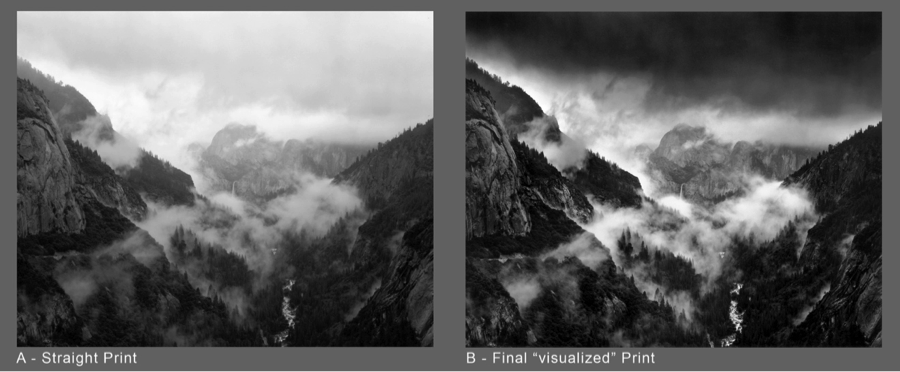
Over the years I’ve evolved a technique I have come to refer to as Selective Masking. I use the term “selective” because it is a physical, hands-on method of tonal control in analog printing, rather that the photometric “unsharp masking”. In its basic form, it’s not techno-anything; it simply is a means of solidifying your own dodging and burning preferences into a “package” which remains absolutely constant from print to print. You can change your mind about how you want that package to perform; you can dodge and burn in greater detail than with traditional methods and with absolute consistency from print to print. It works with either a diffusion enlarger or in contact printing. It does NOT work with condenser enlargers.
Carried to the ’nth degree, Selective Masking can transform the job of printing a challenging negative from one of agonizing difficulty to the mere push of a button: a “straight” print from the untouched, unmodified original negative. Any size print. Local contrast changes can be made, and that oh-so-smooth gradual sky burn can be built into the mask package.
Available in my Online Store: Want to turn a difficult negative into a straight print? This technique has worked well for me in the over 20 years I have been refining it and has been updated to reflect more sophisticated digital techniques. Selective Masking Articles on CD

.
.
.
.
.
.
.
Tags: Alan Ross, Darkroom, Masking, Photography, Printing Negatives, Selective Masking Posted in Darkroom, Tech | No Comments »
Saturday, June 19th, 2010
Making Film Negatives from Digital Files.
Last year I had a wonderful assignment photographing gnarly, twisted zinfandel vines for Ravenswood Winery in California’s Sonoma and Napa Valleys. As the project took shape, it was decided that because some of the vineyards had a lot of irrigation tubing and other unsightly distractions, the final output would be high quality inkjet prints so that unwanted features could be edited out in Photoshop. That all worked out fine, but Joel Peterson, Ravenswood’s founder, wanted some 16×20 silver prints for his office. Two of those images, alas, had tubing and re-bar included in the scene which were impossible to just touch-out in a print. It was either print the lovelies, “warts and all” or get a crash course in going from film to digital file and back to film. So I chose “crash course.” I knew one of my student friends in Southern California had been getting into this field and we conspired to use my project to work out the details. After a few false starts, we succeeded in going from my original 6×7 BW negative to high-res RGB scan and on to a new 4×5 T-Max 100 negative! Lovely 16×20 silver prints were the final result. Bonus: they needed virtually no spot-retouching because that was all fixed in the digital file!
Next I’m going to work on making a BW negative from a color digital image I made in China when I didn’t have access to my 4×5!
The bottom line is that I now feel it is realistic to make repairs and adjustments to images that otherwise might be set aside as unusable for silver printing. For pricing and further information on the process contact Ludo Leideritz at Reflective Image Studios.

Left: scan from original negative; Right, scan from silver print from digital negative.
Barricia Vineyard, planted 1888.
Posted in Darkroom, Tech | No Comments »
Thursday, February 18th, 2010
When I “test” a new paper, or one I haven’t tried in a long time, the first thing I like to do is see how it “feels” compared to a paper I’m used to.
When I got my first sample of the Adox paper, I had just finished producing a batch of Ansel Adams’ Moon and Half Dome prints for The Ansel Adams Gallery. Since the negative (made on 120 Adox R17 12/28/1960) was still in my Omega D5500 enlarger, I had a perfect opportunity to see exactly how the paper would perform with a high quality image I had printed many many times.
The first result: an absolutely lovely image. It required no change in the “no filter” setting I usually use with this negative on Ilford Multigrade FB – so “normal” contrast seemed to be right on. It had a beautiful gradation of tonality from blacks to clean whites. It seemed a bit faster than the Ilford, but for the Adox test I was using a higher concentration of Dektol than I had used for the production printing.
(more…)
Posted in Darkroom, Tech | No Comments »
Tuesday, June 23rd, 2009
Workshop alum and Stanford scientist, Curt Palm, has created a new darkroom timer that significantly “one-ups” the popular Zone VI Compensating Developing Timer.
CompnTemp ® is software rather than hardware and is available for both Windows and Mac computers. I set up a small shelf in my darkroom for my Mac Powerbook and all I have to do to get going is plug in the accessory USB temperature probe and cover the screen with red plastic.
What sets CompnTemp apart from ANY other timer is that is completely user-programmable. if you want your target temperature to be 73 degrees instead of 68 that’s fine. If you want it to count UP instead of DOWN, that’s fine, too.
You can save profiles so you can toggle from one group of settings for prints to another set of preferences for film. It even lets you customize the compensation curves. It also gives you a continuous read-out of the ACTUAL temperature.
(more…)
Posted in Darkroom, Tech | No Comments »
Tuesday, June 23rd, 2009
Print spotting is something none of us can avoid having to take to task on some level. Some of us are better at it than others, some just can’t get the hang of it at all. Some are good at it but just don’t have the time or patience for it. If you or anyone you know would like to have some first-class work done for you, I have just the person.
Katherine Gillis in Lake Wylie, South Carolina has been doing much of my own print spotting and ALL of the spotting on the Ansel Adams Special Edition prints for the last 11 years or so. She used to be here in Santa Fe but for various reasons had to relocate.
She is so good and great to work with that I’ve been FedExing prints to her for nearly ten years. She works on black-and white and color prints and film. She has e-mail but prefers to discuss particular needs on the phone, so if the link above doesn’t get a response, give her a call at 803-631-0117.
Posted in Tech | No Comments »
Tuesday, June 23rd, 2009
According to Ted Orland’s poster Photographic Truths: “No two light meters agree.” Sadly, that does seem to be pretty much the truth – unless you do something about it.
For years I had a pair of supposedly “matched” Pentax digital spot meters that were never closer than 1/3 of a stop from each other – so I had to remember which meter I used for film tests and which one I had in the field. One of these meters had an accident and got sent off to its maker for a rebuild – and came back 2/3 of a stop away from where it had been, now 1/3 higher than the meter it had been lower than! So I sent the other meter off to its maker and after two months got it back about the same as when I had sent it. Which meter was right?
(more…)
Posted in Tech, Zone System and Metering | No Comments »
Tuesday, June 23rd, 2009
It’s something that worries all of us: Is my film going to get wrecked by airport security? I guess the answer is always “maybe”, but recent experience makes me want to say “probably not.”
In the last year and a half I have had the opportunity to make three international trips with 4×5 camera gear and TMax 100 film. Italy via Frankfurt; Scotland; and China. In Albuquerque and in Florence, when connection times allowed the time, a hand inspection (with wipedown) was done without objection, but other times and places made it practical or obligatory to send the carry-on film through the scanner.
On the China trip, my ISO 100 film got “zapped” six times (they even do this at train stations in China). The net result? No trace of fog.
On the Italy trip last year I made three identical exposures on TMX 100 Readyload. I put one sheet in my checked baggage, one in my carry-on to be x-rayed, and one which I requested hand-inspect. The two carry-on films were perfect, but the film in the checked bag showed definite scan lines. The scan lines were probably Zone I or below so didn’t “print,” but the net reccommendation from all of this is:
- Don’t put ANY film in your checked baggage.
- Carry-on film is probably fine with multiple security scans.
Update: November 2008. I just returned from my fifth trip to China with TMax 100 4×5 Readyload film. After, I think, six scans through passenger security machines there was no trace of fog.
Posted in Tech | No Comments »
Tuesday, June 23rd, 2009
In 1998 and 1999 I wrote a 4-part series of articles on Variable-Contrast printing for CameraArts magazine (the “smaller-format” sister of ViewCamera magazine). CameraArts is now defunct in print form however the articles are still available directly through me.
If you have been one of my students and would like something better than the xerox copies of the articles you got in your workshop binder, contact me. I’m offering the Variable-Contrast CD for $30. I’ll even sign it! It’s a single CD with a pdf file which has daisy-chained the four articles together.
Lastly, the illustration photos in the pdf file seem to print a bit on the mushy side with some printers. I suggest printing a single, sample page such as p.23 or p.24 and adjust the contrast and brightness settings on your printer until the images print satisfactorily.
Posted in Darkroom, Tech | No Comments »
|